4 min read

Stop Waiting. Start Scaling. Our Latest Platform Updates Are Live!

4 min read

How Huha Scaled from $1M to $30M: Escaping the 8-Figure Attribution Trap

5 min read

When to Use Last Click Attribution for Ecommerce Marketing

5 min read

Pinterest Integration Release - Wicked Reports Product Update

5 min read

Meta Is Pushing Advantage+ Campaigns Relentlessly

8 min read

iOS 26 and Tracking Parameters: What Performance Marketers Need to Know

5 min read

Meta is pushing Advantage+ campaigns relentlessly.

14 min read

Calculate Your TRUE New Customer Acquisition Cost (NCAC)

12 min read

Is New Customer Growth Killing Your Profit? Master NCAC!

16 min read

Stop Wasting Your Marketing Budget: Master Marketing Attribution

3 min read

E-learning

By Scott Desgrosseilliers on Feb 28, 2020 11:39:58 AM

Knowing and understanding your marketing data helps you:

  • Stop “spray and pray” marketing. With Wicked Reports you won’t have to guess or take stabs in the dark. When you can see the exact impact of each marketing campaign, you can see exactly what works and what doesn’t. You can learn from your mistakes and build on what’s working.
  • Stay focused on the metrics that matter. Modern marketers have access to so much data that it can be hard to know what’s important and what isn’t. Wicked Reports helps you stay focused on what’s important — the ROI of each marketing campaign. By focusing on real results — revenue, customers, and orders — you can avoid being distracted by vanity metrics and other statistics with little correlation to your bottomline.
  • Invest your time wisely. When you invest your time into a marketing campaign, you’re missing the opportunity to invest it elsewhere. If you invest your time into a marketing opportunity that returns 20% and you could have invested it into a marketing campaign that returned 200%, you just cost your business 180% of the ROI it could have had.
  • Save on marketing and advertising spend. When you can see exactly how well each paid ad performs, when you can see the exact impact on your business in terms of revenue, you know which ads you should kill off and which ones you should invest more into.
  • Piece together your business’s unique growth plan. As Wicked Reports reveals the true ROI of each marketing campaign, and shows you where your best customers are coming from, your business’s growth plan becomes clear.

This last point deserves a bit more attention because it gets to the core of why marketing is so important to your business… effective marketing creates customers and helps your business grow.

Topics: Learn More elearning courses
4 min read

Subscription

By Scott Desgrosseilliers on Feb 28, 2020 11:26:43 AM

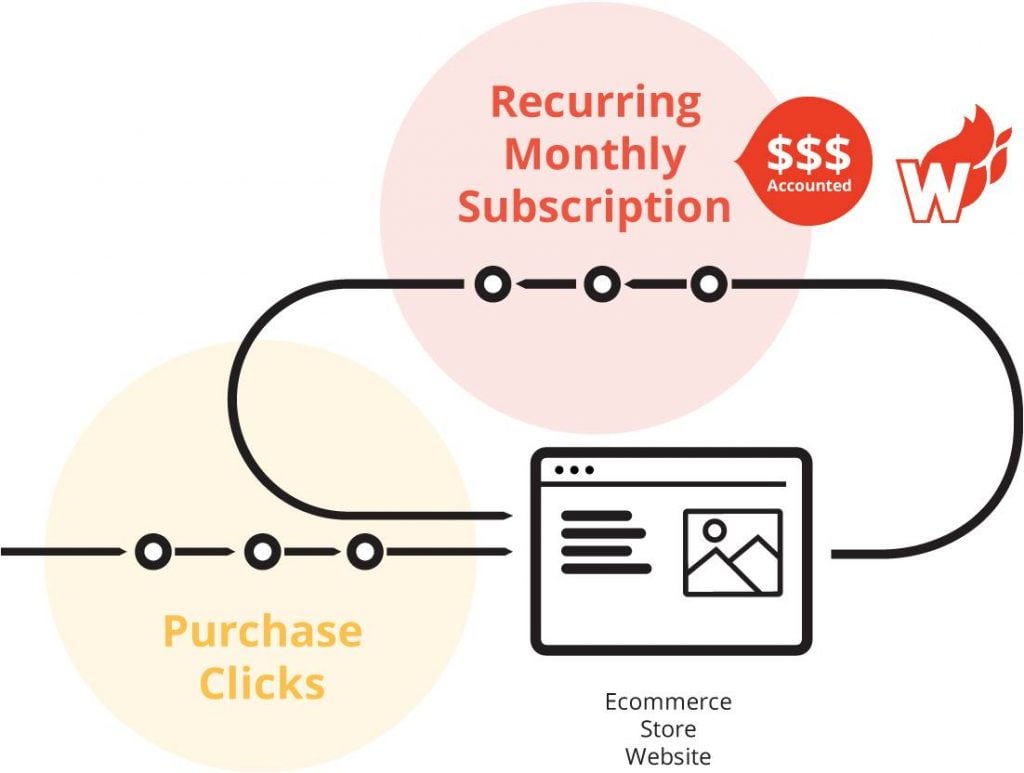
Attribution is tricky when it comes to recurring revenue, because is is critical to track lifetime value. This is where Wicked Reports shines! So it’s easy to assume that the last marketing email or online ad is what got a customer to purchase. But you’re probably wrong. Let me tell you a secret: the most important factor is time.

Topics: Learn More
3 min read

Shopify

By Scott Desgrosseilliers on Feb 28, 2020 11:12:24 AM

You look in your Shopify app and see that you made a sale. That’s great!

Now you want to do more of what brought the sale in because it worked. Of course, that’s only logical. So how do you bridge the gap between your marketing programs and Shopify data?

But now you ask . . .

  • Where did that customer come from?
  • Was it that killer email you sent out last week to your own list?
  • Did it come from your new Facebook ad?
  • Or could it have been the blog post that went up last month?

Shopify can’t tell you that. Their records are based on last click, which means you see only the last thing a customer clicked on before they appeared in your Shopify store. It’s the final conversion but it’s not the whole story. So how do you bridge the gap between your marketing programs and Shopify data?

Multiple Outreach Programs
After all, we know that customers often don’t buy right away. It can take weeks or even months before they pull out their card and hit Buy. In that time you have probably reached out to them multiple times and in several different ways. You’ve used different messages, tested several offers, and tried discounts. But you don’t know which one worked.

All the data from those programs goes into your CRM but how can you bridge the gap between marketing program and action, prospect and customer, CRM and Shopify to find out which marketing program got you a customer and brought in revenue?

Again, Shopify can’t tell you that.

Tracking the Customer Journey
But Wicked Reports can. In fact, we track the entire customer journey from first optin to last click so we can tell you exactly what brought in that sale to Shopify. Not just the first optin or the last click—you see the precise program that caused your customer to buy.

You can also see where your best customers came from long before they appeared in your Shopify store. Now you can go back and mine that rich source again.

Topics: Shopify Learn More
1 min read

ROI From Google Ads
By Scott Desgrosseilliers on Feb 28, 2020 11:07:35 AM

Many SMBs do not understand the ROI they are getting from Google Ads because their sales are happening offline or they have a subscription based model where one sale results in recurring monthly revenue. Wicked Reports is able to connect with CRMs and pull in sales data to show businesses the ROI they are getting from many different advertising channels.

Topics: Google Ad Manager Learn More
4 min read

The Critical “Missing Piece” of the Ecommerce Growth Puzzle
By Scott Desgrosseilliers on Feb 28, 2020 10:47:52 AM


Growing an ecommerce store is like putting together a puzzle with four critical pieces:

Topics: Ecommerce Learn More
3 min read

Agencies

By Scott Desgrosseilliers on Feb 28, 2020 9:56:50 AM

As a consultant or agency, you want to give your marketing clients the most value—and impact—for their money. After all, they trust you to be their expert partner, someone who knows more, has outstanding creative and can analyze the results. They want great ideas, powerful copy, and deep expertise.

Topics: Agency-Consultant Learn More

It’s an Attribution Game Changer!

By Scott Desgrosseilliers on Feb 4, 2020 7:01:33 AM

Topics: attribution Learn More
2 min read

Hubspot and Wicked Reports
By Scott Desgrosseilliers on Aug 13, 2019 10:41:23 AM

Our integration just got stronger and more powerful. In brief summary, you now get the lifetime value and ROI of all your HubSpot leads based on real leads and sales wherever those sales are occurring, automatic email tracking with no need for UTMs, even historically, based on real sales, and this is a native Wicked integration which is authorized very quickly.

Topics: Learn More HubSpot
5 min read

Podcast Attribution – How to track clicks, leads, and sales for a podcast episode

By Scott Desgrosseilliers on Oct 24, 2018 10:30:38 AM

There a couple of ways to connect podcast episodes to leads and sales using Wicked Reports.The quick version for those that are familiar with Wicked Reports technology – put unique UTM links on your emails, texts, and social posts about a podcast episode.  Wicked Reports will connect the unique UTM tracking links to contacts in your CRM and sales from your shopping cart.

There are 3 valuable data points you will get.

  1. Podcast episode link clicks.
  2. Podcast episode link clicks that find leads.
  3. Podcast episode link clicks that convert sales.

For each of those data points, the raw number of clicks, leads, and sales helps you determine interest and bottom line value to your business.

When the clicks, leads, or sales are higher than average, this means you have struck a nerve in your audience. Do MORE of that podcast content AND type of marketing for your podcast.

When the clicks, leads, or sales are lower than average, something missed the mark with either the podcast content or the marketing of that podcast.

If you need a primer on UTM tracking links, here is Google’s reference. We will use this to build the tracking link for a podcast episode below.

When sending an email about a podcast, it’s important to construct the link the correct way.

As an example, let’s use the great podcast host James Schramko and this particular episode I was on:  https://www.superfastbusiness.com/business/590-the-top-conversion-tips-after-1-5-billion-dollars-in-sales-and-retention-tips-with-scott-desgrosseilliers-from-wicked-reports/

Step 1 – Paste the link into the link field of the URL Builder:

Step 2 – Set the campaign source.  I see a lot of people type in “Podcast” here.  I disagree.  You are going to spread the news of your podcast on a number of marketing sources, so don’t make that mistake.  You should put “Email” if the source of the link click is from your email software.  You’ll indicate podcast in a different field.

Step 3 – Medium. This is the delivery mechanism of the link.  Since you are emailing this out, put “email” again just like you did in Source.

Step 4 – Campaign Name. Finally, you can indicate this is about a podcast.  If your podcast just got produced, you are probably ready to shout out the news on all available platforms.  For our example, I’m assuming you are broadcasting this podcast link via email.  I’ve input “podcast-episode-broadcast”.  Notice I used a “-” between each word…while link technology sometimes can preserve spaces, I don’t trust it, so don’t leave spaces in your values.  Each new podcast episode, I will use the exact same campaign name, so I can compare all my episode’s performance.

Step 5 – Campaign Term.  A lot of people do not put a value in this field, because it says “identify the paid keywords”.  However, we want to compare the performance of this podcast episode vs. search keywords, facebook targeting, text messaging, and organic posts on our Facebook fan page.  When comparing data, it is a lot easier to have values in all 5 UTM values.  This is why I advocate putting in an easy to understand value for your audience of this link.  Since we are emailing this to your email list, “email-list” is what to put into the term field. (Note – if you are only emailing this to an email segment that has subscribed to your podcast updates, THEN you could put “podcast-email-list”.)

Step 6 – Campaign Content.  This where you identify the podcast episode.  Prefix the episode name with the episode number so you can sort your data by episodes chronologically, and remember not to have any spaces.

Step 7 Copy the generated campaign URL and insert into your email broadcast…happy tracking!

A couple notes on the process.

  1. You can shorten these URLs using the “convert URL to short link” option or any link shortener you like – just make sure the UTMs hit a page with Wicked Reports tracking on it.  If you do NOT use Wicked Reports, make sure your Google Analytics code is on the page.
  2. Want to create your links for your other platforms now?  Simply make a few edits in the fields and copy the updated links while you are here.

Here are a couple of samples of additional tracking links that could be used.

For a Facebook Fan Page on the podcast.

For Twitter (even though you probably won’t get any sales)

Notice in all the links, the campaign and the content stay the same.  The source is the channel I’m marketing on.  The medium is the mechanism for link delivery.  And the term is the audience identification.

For ads, the same thing applies.  But who wants to create a ton of UTM links all day for their ads?  That’s why we have a Google Tracking template and Facebook auto-tracking.

I hope your podcast does great, and your podcast attribution proves that great episodes grow your sales faster.

Topics: Podcast Learn More