


Maybe you've had this experience. You run ads across multiple channels, and a big share of the budget goes to video: TikTok, YouTube, Meta video at the top of funnel.
People don't click those ads much. They watch, then later they open Google and search your brand name. The click attribution goes to whatever got clicked last: Google brand, Microsoft brand, organic search, or in the worst case the order comes through completely unattributed.
The video that actually started the sale gets no credit. But you know it's working, because when you stop running those campaigns, revenue drops. When you scale them, it climbs. The clicks just never told that story.
Halo Modeling resolves that conflict. It gives credit back to the channels that earn attention but don't collect clicks, and unlike every black-box approach out there, it shows you exactly how.
The one rule that makes Halo trustworthy
Halo is zero sum. Total attributed revenue never goes up. For Meta or TikTok to get more credit, that credit has to come from somewhere: the channels that were flattered by last click, like Direct, branded search, and organic.
In my account, with an influencer-heavy preset active, Halo moves Meta sales from 25.6 to 35.3. Organic drops from 15.2 to 3.8, because that preset sends 75% of organic's attributed value into the pool. Nothing was invented. Credit moved from the channel that caught the sale to the channels that caused it.
One more thing that matters: Halo columns sit beside your click attribution. They never replace it, and they never touch your attributed numbers. They're modeled estimates, directional by design, there to inform budget decisions, not to feed platform bidding.
The fast path: pick a preset and save
You don't need to understand the model to use it. We've defined the most common use cases, and clicking one sets everything for you:
1. Social Driving Branded Search and Organic Lift.
Your social ads plant the idea, customers come back through branded search or organic listings, search gets the credit, social looks like it does nothing.
2. Heavy Influencer + UGC Video.
Influencer and user-generated video drives discovery, but the buying happens through other doors.
3. Video Creative.
Lots of video at TOF, view-heavy and click-light.
4. CTV Impact.
Connected TV builds awareness that never produces a trackable click.
Click the use case that fits your business, scroll down, click save. Done. The moment you change any individual setting, you're in Custom, and you can always reset to defaults.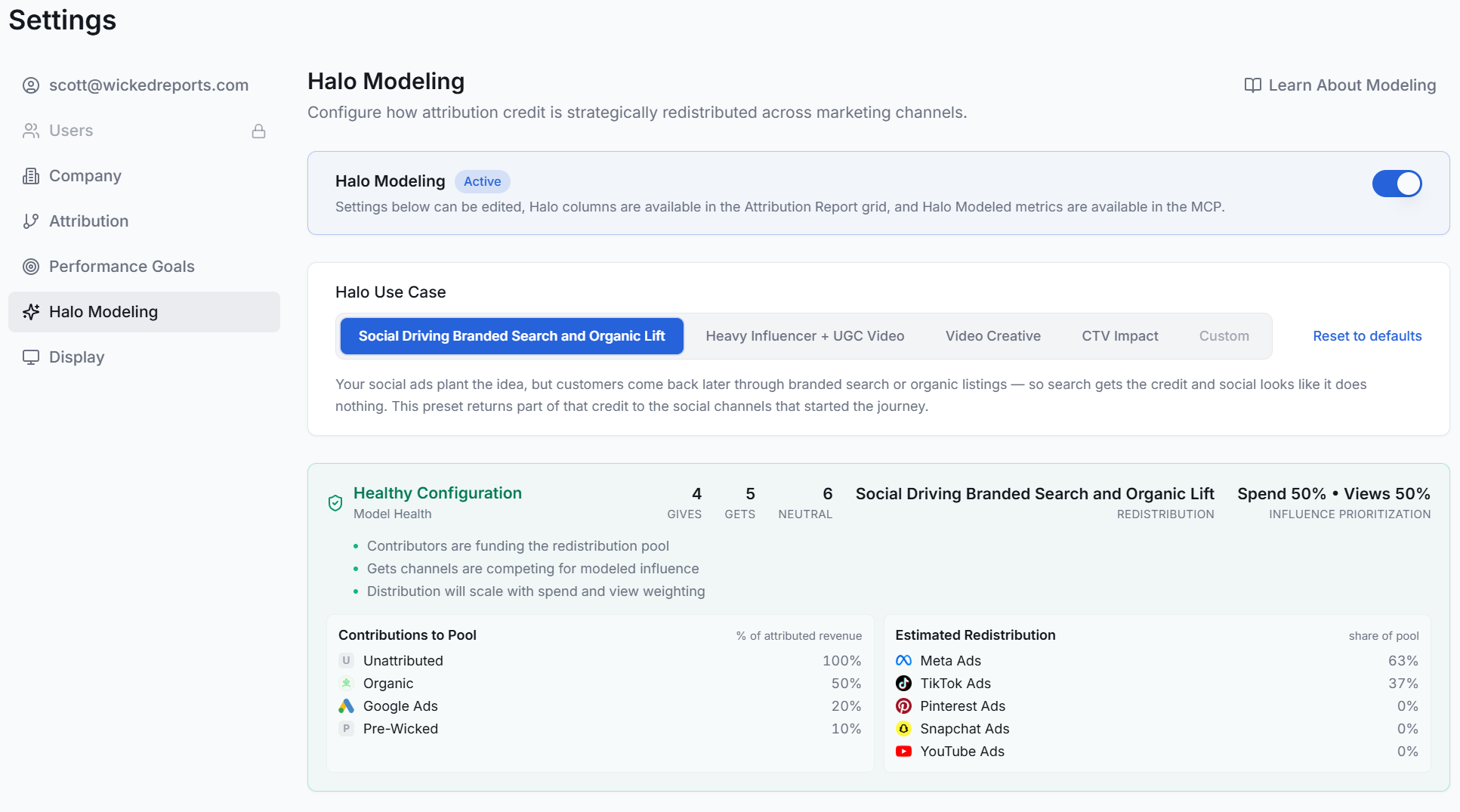
For the advanced crowd: how the model actually works
If you want to build your own model, here's the machinery.
Every channel is a Gives, a Gets, or Neutral. Gives channels contribute a share of their attributed sales, revenue, and customers to a distribution pool. Gets channels compete for that pool. Neutral channels are untouched.
The pool redistributes on two factors: how much each Gets channel spent in the period, and its view influence. A Meta account running mostly image ads might carry low view influence. A Meta account running mostly video earns far more views than clicks, so you'd set it high. That weighting tells the model how much of the pool each channel deserves.
One global lever sits above it all: Influence Prioritization.
It controls whether redistribution favors channels by media investment scale or by awareness-driven impact. We start everyone at 50/50 so neither dominates, and you can slide it either way.
Gives percentages are yours to set.
With the influencer preset, Google Ads gives 20% to the pool. The assumption: your video content sends people to Google to type your brand name, so your Google brand campaigns collect attribution they didn't fully earn. If branded search is a bigger or smaller share of your Google budget, change the number.
Unattributed and Pre-Wicked can only give.
And honestly, think about what unattributed revenue is. What's the real chance someone never heard of you, never clicked anything, and bought? It's a tracking gap, not a mystery shopper. I set unattributed to give 100%, so every dollar of it flows back to channels that more likely deserve it.
Model Health keeps you honest.
The configuration panel shows your Gives, Gets, and Neutral counts and tells you whether the setup is reasonable before you save.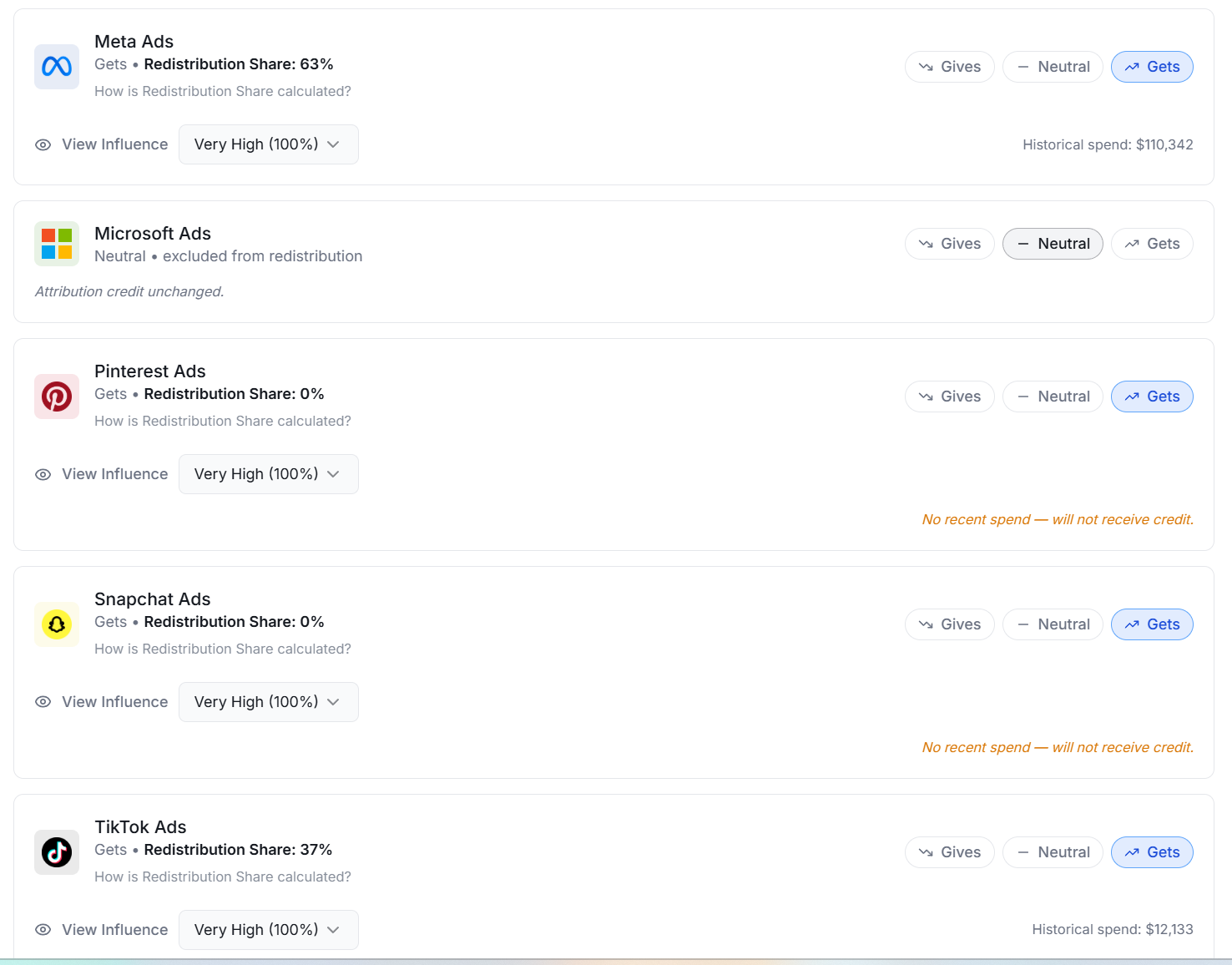
Where you see it : the Attribution Report
Once Halo is enabled, new columns appear in your Attribution Report grid: Halo Sales, Halo Revenue, Halo nRevenue, Halo ROAS, Halo nROAS, Halo new customers, Halo total customers, Halo nCAC.
What I like to do is add each Halo column next to its sister metric: sales beside Halo Sales, nCAC beside Halo nCAC. You see the click number and the modeled number side by side, with a Gets or Gives badge telling you which direction credit flowed.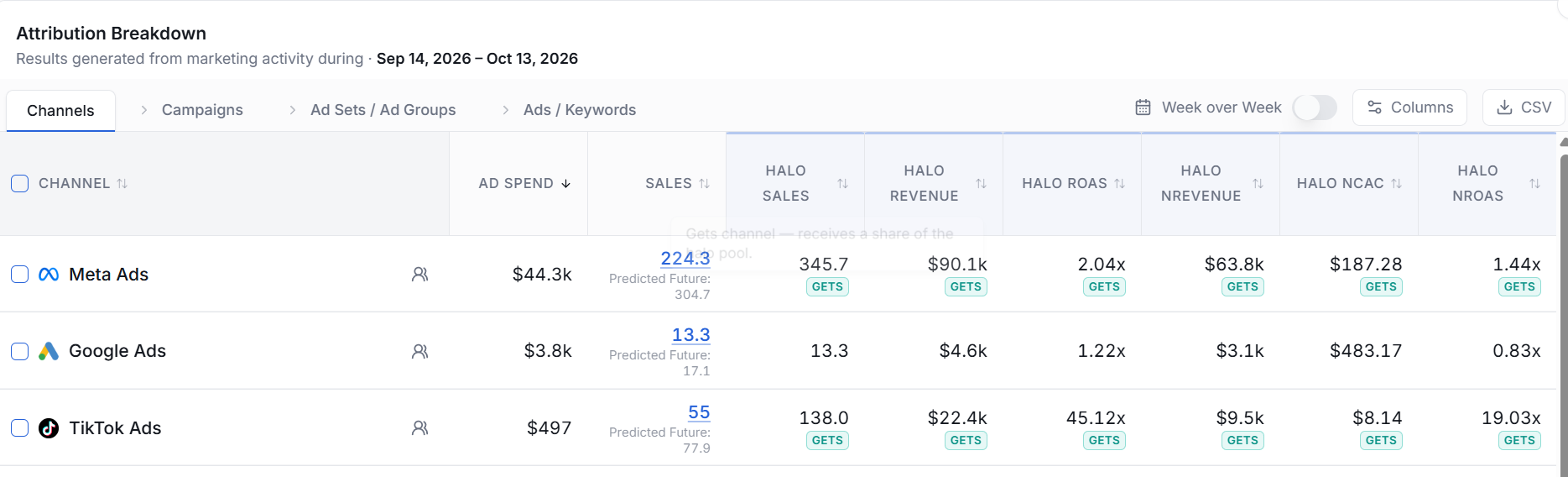
The columns hold through every breakout. Day by day, week over week, campaign level, ad level. They work as filters too: type Halo in the filter box and every Halo metric is filterable. And if you prefer to run entirely off Halo metrics, you can remove the standard columns and live in the modeled view. Your call. Turn Halo off in settings and the columns disappear completely.
The payoff step: adjust budgets
Halo exists to change decisions, not decorate the grid. Re-rank your channels and campaigns on Halo ROAS and Halo nCAC next to their click numbers. The campaigns that look weak on clicks but strong on Halo are your underfunded demand creators. The ones that look strong on clicks and weak on Halo are riding demand someone else created.
That's the whole point of transparency: when the model says move budget, you can see exactly why, interrogate every assumption, and defend the decision to anyone who asks.
How to get it
Halo is in alpha. Contact support and we'll turn it on with you, help you pick the right preset, and sanity-check your first configuration.
Not in Wicked yet? See Halo and the rest of the platform working in about two minutes : See the demos

.png)